Client portal development is the process of designing and building a secure online system where clients can log in to access information, exchange documents, submit requests, track work and communicate with a business. It can be delivered as a custom-built portal or through a no-code platform, depending on the required features, integrations, budget and security model.
This guide is for operations leaders and founders evaluating a portal. We compare build vs buy, cost drivers, security controls and implementation.
What is Client Portal Development?
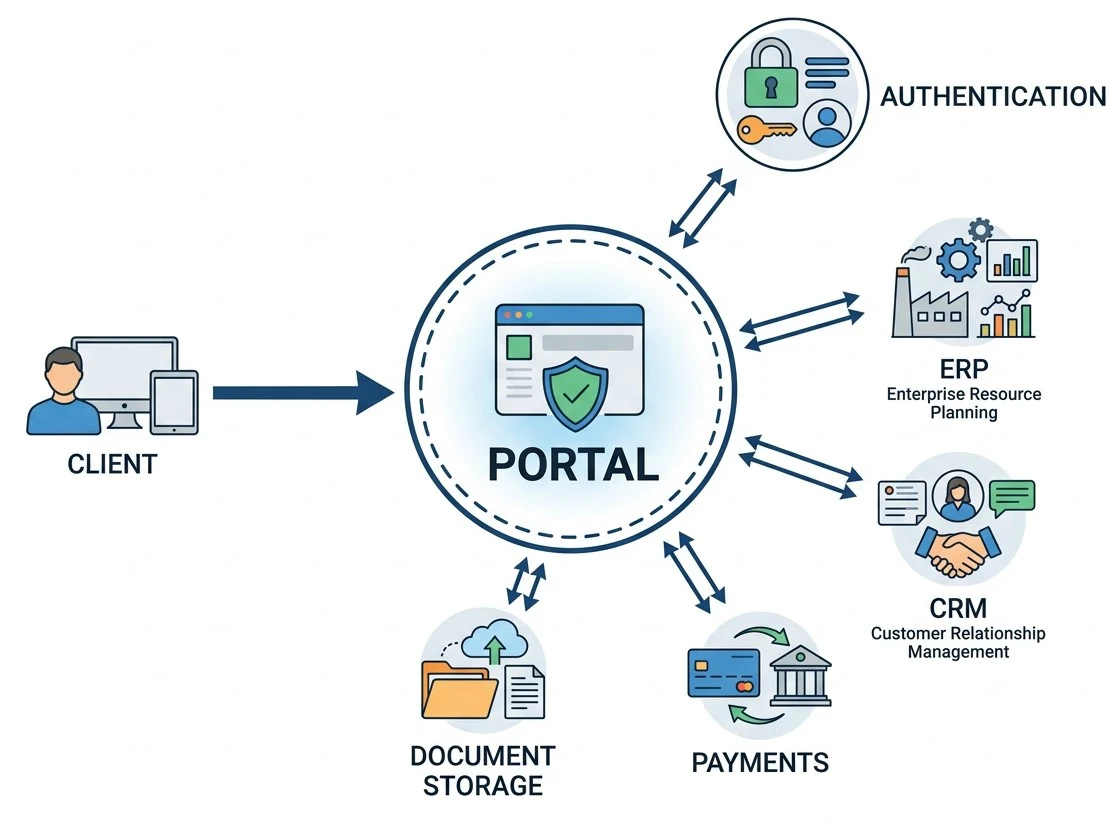
Client portal development creates a private digital workspace that gives external users controlled access to services, information and workflows. A portal might let clients review status, upload documents, approve work, submit requests, view invoices or message a team. The right scope for client portal development depends on the business process rather than on a fixed feature list.
Client portal vs customer portal vs self-service portal
The terms overlap. A client portal usually supports an ongoing service relationship, while a customer portal may focus on account information, orders or support. A self-service portal lets users complete routine tasks or find answers without direct staff involvement, while a self-service portal can also reduce repetitive support requests.
Core Features Of a Client Portal
The core features of client portal development should match the user's journey and the team's workflow. A practical client portal development plan may include:
- Secure user registration and login
- Role-based access and permissions
- Client-specific dashboards
- Document upload, download and sharing
- Forms and service requests
- Project or case status tracking
- Secure messaging and notifications
- Approvals, acknowledgements or e-signatures
- Invoices, payments or billing information
- Search and knowledge-base content
- Calendar, appointments or deadlines
- CRM, ERP, accounting and other system integrations
- Audit logs and activity history
- Mobile-responsive access
- Administration tools for internal teams
Build vs Buy: Should You Develop a Custom Portal or Use a No-Code Tool?
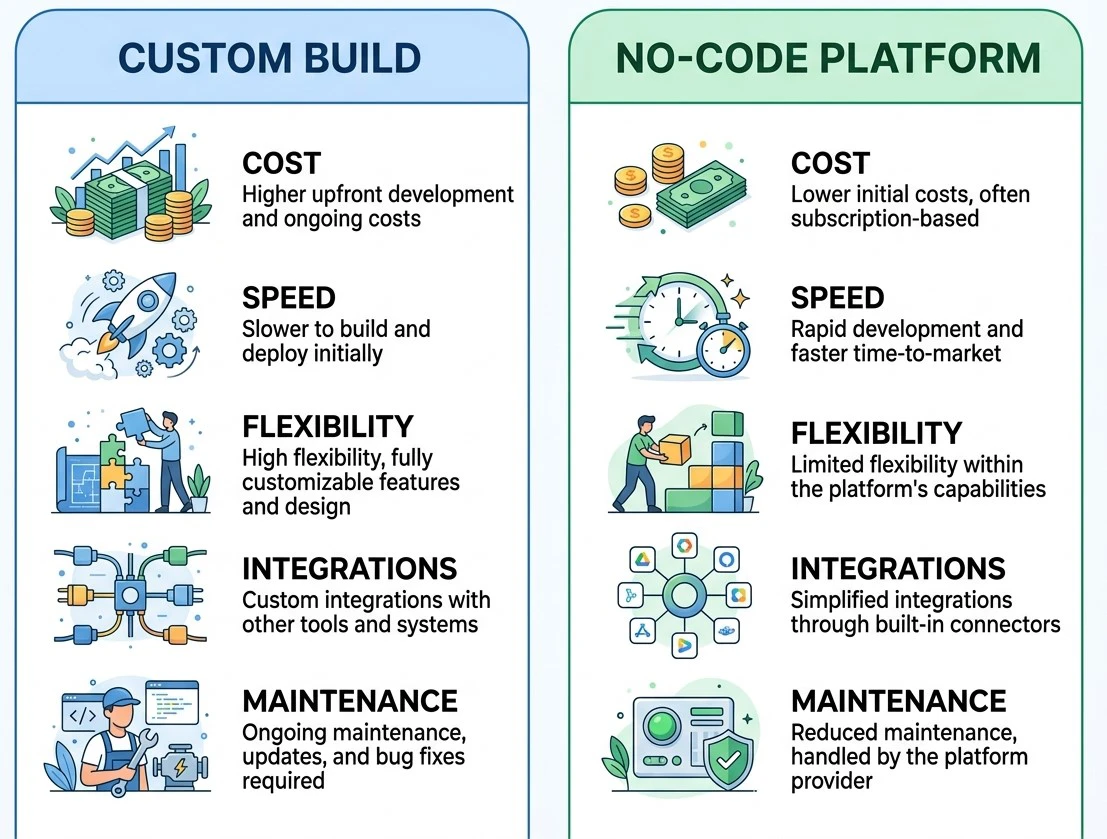
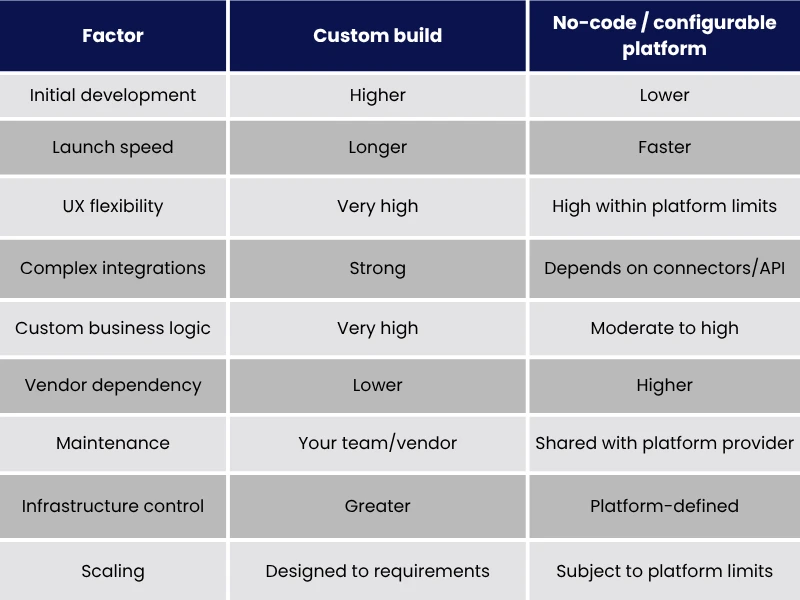
The build-vs-buy decision depends on workflow complexity, integrations and the level of architectural control required. A client portal development project offers more control, while no-code can reduce implementation time and upfront development effort.
Softr supports client portals with user groups, permissions and integrations; Knack provides role and data-access controls; Moxo focuses on client workflows such as documents, approvals, messaging and payments; and Zoho Creator provides portal capabilities within a broader application platform.
When a no-code portal is the smarter choice?
No-code is often practical when the portal follows established workflows, uses standard forms and dashboards, and does not require highly specialised application logic. It can also be useful for validating the experience before committing to a larger custom build. However, platform fit matters. Review API capabilities, integration limits, user and permission models, data residency, export options, vendor lock-in and the platform's security documentation before choosing.
How Much Does Client Portal Development Cost?
Client portal development cost varies primarily with scope, integration complexity, security requirements and the amount of custom engineering involved. A simple configurable portal may require platform licensing and implementation work, while a custom system can involve UX design, backend development, infrastructure, integrations, testing and ongoing support.
Separate one-time and recurring costs:
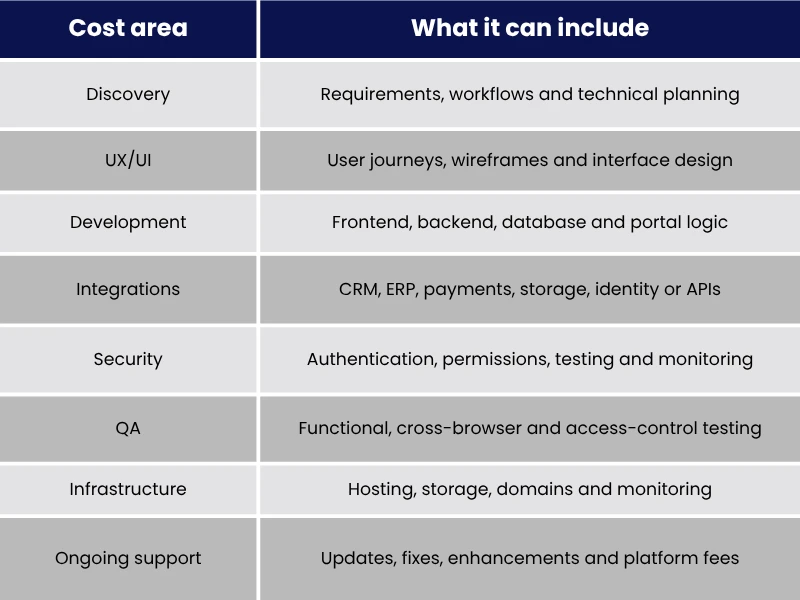
Estimate from a defined feature list and integration map. If the portal will evolve, budget for maintenance and future changes from the start.
Security Requirements for a Client Portal
A secure client portal needs more than a login screen. It should combine strong authentication, least-privilege access, data protection, secure file handling, monitoring and testing so each client can access only the information intended for them. At minimum, assess:
- Authentication, including MFA where appropriate
- Role-based and record-level permissions
- Encryption in transit and at rest
- Secure session management and password policies
- Tenant and record isolation
- Audit logging and monitoring
- Secure file upload and download controls
- Backup, recovery and retention policies
- Vulnerability management and security testing
- Secure API authentication
- Data residency and regulatory requirements
- Administrative access controls
Platform security varies. For example, Softr documents TLS encryption, role-based permissions, MFA and SOC 2 Type II controls; Knack documents role-based access, record-level permissions, encryption and SOC 2 Type 2 compliance; Moxo lists encryption, SAML SSO, audit trails and SOC 2 Type II; and Zoho Creator documents data isolation, encryption and security policies including MFA and IP restrictions.
Multi-tenant Data Isolation Explained
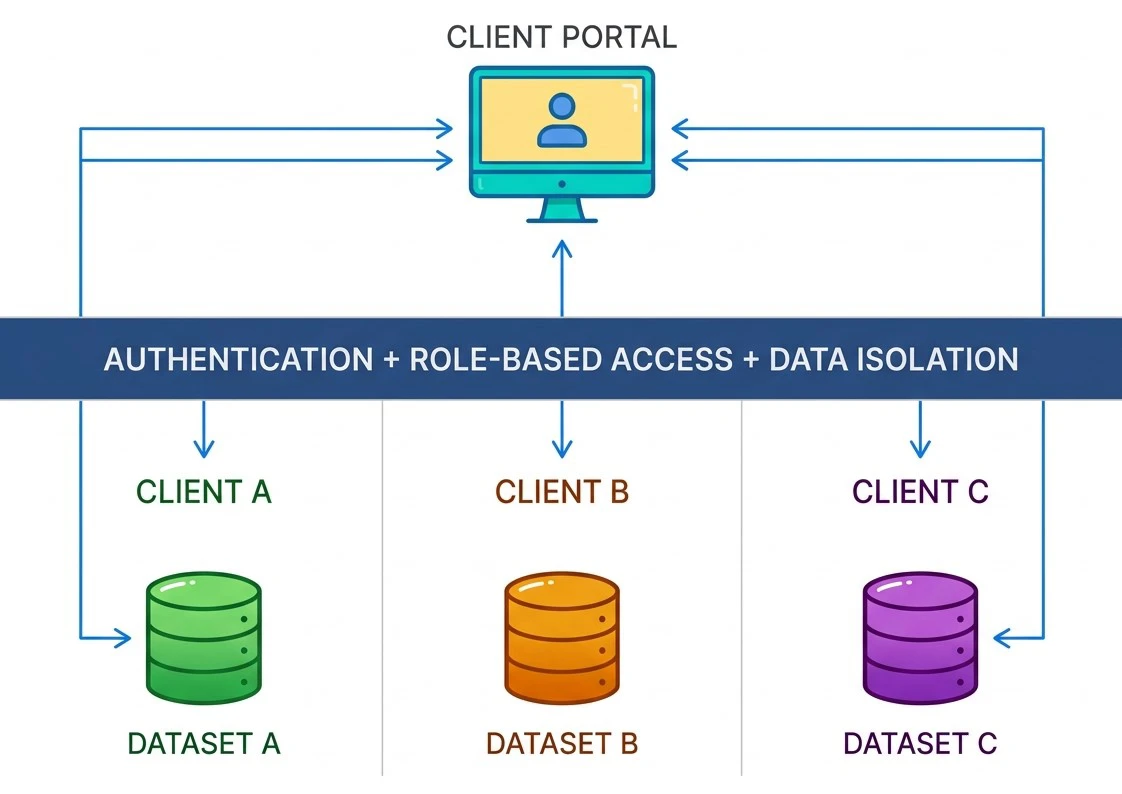
Multi-tenant data isolation means users from different client organisations share an application environment without being able to access one another's records. In practice, permissions must be enforced at the data layer, not merely by hiding a page or button.
For a tailored portal, define the tenant model early: identify the organisation, users, roles and records associated with each account, then enforce those relationships across queries, APIs, files and exports. For no-code solutions, verify that the platform's permission model protects the underlying records rather than only controlling what appears on screen. Knack, for example, distinguishes page visibility from data access controls, while Zoho Creator documents logical separation of customer service data.
The Client Portal Development Process
A reliable client portal development process starts with business requirements and ends with measured adoption, security review and ongoing improvement.
- Define users and goals: Identify client types, internal users, key problems and measurable outcomes.
- Map workflows: Document what clients need to view, submit, approve, download or request.
- Choose build or buy: Compare requirements against no-code platforms and custom architecture.
- Design the experience: Create user journeys, information architecture, wireframes and permission rules.
- Plan the data model: Define tenants, users, roles, records, documents and relationships.
- Build integrations: Connect CRM, ERP, finance, storage, identity and other required systems.
- Implement security: Configure authentication, permissions, encryption, logging and secure file handling.
- Test: Test workflows, mobile access, integrations, performance and cross-tenant access boundaries.
- Pilot: Release to a small client group and collect usability and operational feedback.
- Launch and improve: Monitor adoption, support requests, security events and new requirements.
Knowing how to build a client portal is therefore about designing the complete client-to-business workflow. A good implementation makes the portal useful to clients while reducing unnecessary work for internal teams.
Build or Buy?
Choosing between custom development and a ready-made platform comes down to your workflows, integrations, security requirements, budget and desired level of control. A no-code solution may suit straightforward requirements, while custom development can provide greater flexibility for complex needs. Start with the requirements, not the technology. A well-planned client portal development approach should improve the client experience while fitting securely into your existing systems.
If you are evaluating a portal and want to clarify the right scope, architecture and build approach, schedule a scoping conversation with Phentech.