
A web application penetration testing checklist starts with a controlled security assessment, while a web application penetration test simulates attacks against a web application to identify exploitable weaknesses before real attackers do. This checklist is designed for security engineers, development teams, IT leaders, and buyers scoping a professional pentest. It follows the core areas covered by the OWASP Web Security Testing Guide (WSTG), while adapting them into a practical workflow for modern web apps and APIs.
What is web application penetration testing?
Web application penetration testing checklist planning combines reconnaissance, manual testing, controlled exploitation, and evidence collection to determine whether security controls actually resist realistic attack paths. Unlike a simple vulnerability report, a pentest considers how weaknesses can be chained across authentication, authorization, business logic, APIs, client-side code, and infrastructure.
Penetration testing vs vulnerability scanning
A scanner searches for known patterns, misconfigurations, and common weaknesses at scale. A web application penetration testing checklist goes further: a tester manually validates findings, explores authenticated and unauthenticated paths, tests application logic, and assesses whether separate weaknesses can be combined. Scanning is valuable for coverage; the web app pentest checklist provides the manual context needed to understand actual risk.
How to use this checklist
Use this web application penetration testing checklist and penetration testing checklist for web applications as a scoping and quality-control document. Define authorized targets, environments, accounts, testing windows, excluded systems, data-handling rules, and success criteria before testing.
| Testing stage | Primary objective | Typical output |
| Reconnaissance | Map the attack surface | Hosts, technologies, endpoints |
| Authentication | Validate identity controls | Authentication findings |
| Authorization | Test permissions | Access-control findings |
| Input validation | Identify injection risks | Injection/XSS findings |
| Business logic | Test workflow abuse | Logic and workflow findings |
| API/client-side | Assess modern application interfaces | API and browser findings |
| Infrastructure | Identify configuration weaknesses | Configuration findings |
| Reporting & retesting | Drive remediation | Final report and retest results |
Then map each test to evidence, severity, affected assets, and remediation. The OWASP web application testing checklist is a useful baseline, but scope should reflect the application's architecture, integrations, data, and threat model.
1. Reconnaissance & information gathering
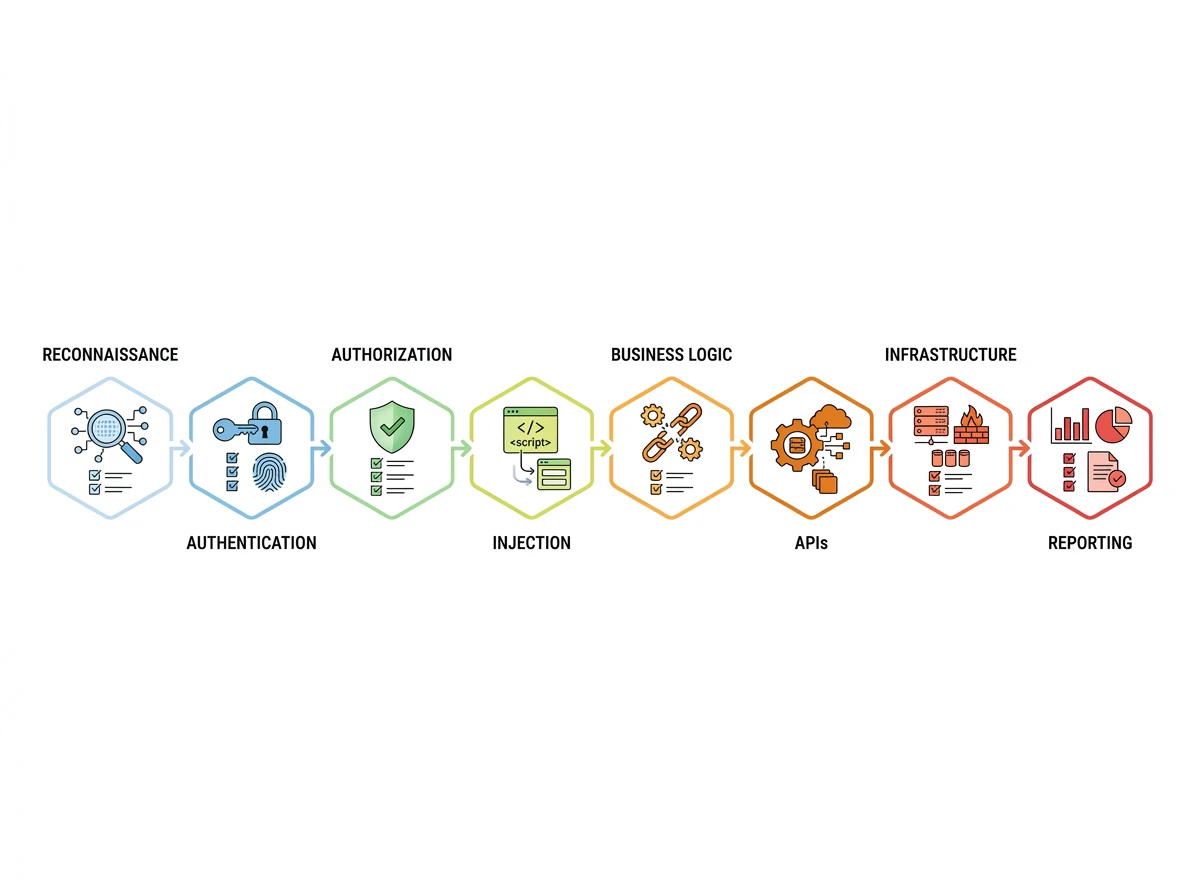
The first category, reconnaissance & information gathering, establishes the application's attack surface. A web application penetration testing checklist helps testers systematically identify exposed functionality before active testing begins.
- Enumerate subdomains and hosts.
- Fingerprint the technology stack, server, frameworks, libraries, and versions.
- Map all entry points, endpoints, HTTP methods, parameters, forms, and file paths.
- Review robots.txt, sitemaps, JavaScript bundles, backups, metadata, and exposed files.
- Identify authentication, authorization, and session mechanisms.
2. Authentication & session management testing
authentication & authorization testing matters because authentication failures can expose entire accounts, while weak sessions can allow attackers to persist after login.
- Test weak password policies, username enumeration, brute force controls, and credential stuffing resistance.
- Check multi-factor authentication enforcement, bypasses, recovery paths, and trusted-device logic.
- Test session token generation, entropy, expiry, rotation, cookie flags, and session fixation.
- Verify secure logout and server-side session invalidation across devices and browsers.
- Test password reset, account recovery, email verification, and recovery-token handling.
3. Authorization & access control testing
Authentication proves who a user is; authorization determines what that user can do. A useful penetration testing checklist for web applications therefore tests permissions at every sensitive function and object.
- Test broken access control and horizontal or vertical privilege escalation.
- Check for insecure direct object references (IDOR) and predictable identifiers.
- Verify role-based access boundaries for users, administrators, support staff, and service accounts.
- Test forced browsing to restricted pages, files, functions, and API endpoints.
4. Input validation & injection testing
Input controls should be tested wherever user-controlled data reaches queries, interpreters, templates, files, or browsers.
- Test SQL injection and NoSQL injection across relevant parameters and data flows.
- Test cross-site scripting (XSS): reflected, stored, and DOM-based.
- Test command, LDAP, expression-language, and server-side template injection.
- Test cross-site request forgery (CSRF) on state-changing actions.
- Test file upload controls, content validation, executable-file handling, and path traversal.
5. Business logic & workflow testing
Business logic flaws can evade automated scanners because the application may be technically functioning as designed. Test whether the design itself can be abused.
- Test price, quantity, discount, refund, credit, and transaction manipulation.
- Bypass required workflow steps or perform actions in an unsafe sequence.
- Test replay of requests, duplicate submissions, and race conditions.
- Check whether users can approve, cancel, or modify actions they should not control.
- Test limits, quotas, rate rules, and transaction boundaries.
- Examine multi-step onboarding, checkout, approval, and verification flows.
- Test whether business rules remain enforced through direct API requests.
6. API & client-side security testing
Modern applications frequently expose functionality through REST, GraphQL, mobile-facing endpoints, JavaScript, and third-party integrations. A complete web application penetration testing checklist should cover these paths rather than treating the browser as the whole application.
- Enumerate API endpoints, methods, parameters, schemas, and undocumented routes.
- Test API authentication, authorization, object-level access, and excessive data exposure.
- Check rate limiting, pagination, mass assignment, parameter tampering, and error handling.
- Test CORS, security headers, browser storage, DOM sinks, and client-side secrets.
- Inspect JavaScript for exposed keys, endpoints, environment details, and sensitive logic.
- Test GraphQL introspection, query controls, resolver authorization, and excessive query depth where applicable.
- Validate third-party callbacks, webhooks, OAuth flows, and integration trust boundaries.
7. Security configuration & infrastructure
A web application penetration testing checklist also treats configuration weaknesses as a core risk because they can undermine otherwise secure application code.
- Check TLS configuration, certificate validity, redirects, and secure transport enforcement.
- Review security headers, cookie attributes, CORS policy, and cache controls.
- Identify exposed admin interfaces, debug modes, directory listings, backups, and management endpoints.
- Check server, framework, dependency, container, and platform versions for known risks.
- Test error messages for stack traces, secrets, internal paths, and excessive technical detail.
- Review cloud storage, DNS, CDN, WAF, firewall, and deployment exposure relevant to the application.
- Verify that secrets are not embedded in source, configuration files, logs, or client-side code.
8. Reporting & Remediation
A web application penetration testing checklist is incomplete if reporting is weak. Findings should be documented with a clear title, CVSS severity, affected asset, evidence, business impact, reproduction context, and specific remediation guidance.
| Report element | What it should contain |
| Finding title | Clear description of the vulnerability |
| Severity | CVSS rating plus business context |
| Evidence | Requests, responses, screenshots, or relevant proof |
| Impact | What an attacker could access, change, or compromise |
| Remediation | Practical technical fix or mitigation |
| Retest status | Confirmed fixed, partially fixed, or unresolved |
After fixes are deployed, retest each finding and record whether the vulnerability is resolved, partially resolved, or still reproducible. This is where a VAPT provider adds value beyond a scan: skilled testers validate exploitable conditions and confirm remediation.
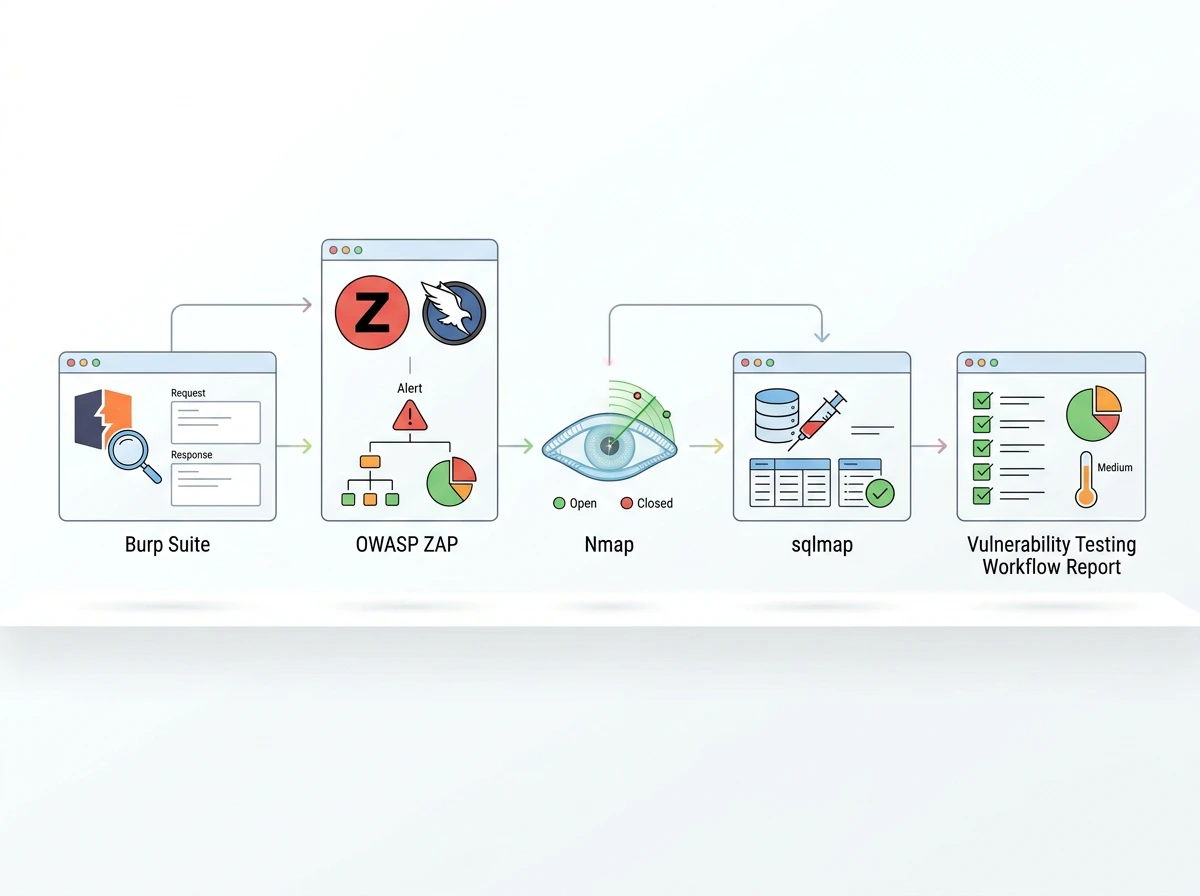
Tools used in web application penetration testing
- Burp Suite – intercepting proxy, request manipulation, crawling, and manual web security testing.
- OWASP ZAP – open-source proxy and automated web application scanning.
- Nmap – network, host, port, and service discovery.
- sqlmap – automated SQL injection testing in authorized environments.
- Nikto / Nuclei – known-vulnerability, configuration, and template-based checks.
A named-tool list is useful, but tools should support tester judgment rather than replace it.
Why a Comprehensive Web Application Penetration Test Matters
A strong web application penetration testing checklist is more than a list of scanner outputs. It should guide structured reconnaissance, authentication & authorization testing, access-control validation, injection testing, business-logic analysis, API review, configuration assessment, reporting, and retesting. Use it to scope engagements, identify coverage gaps, and make security findings actionable.
Phentech provides VAPT and web application security testing to help businesses identify vulnerabilities and strengthen their security posture. Phentech is ISO 27001 certified. Explore Phentech's Security solutions or schedule a consultation to discuss your application's scope, testing objectives, and security requirements.