Approval delays can hold up purchasing, payments, hiring and customer proposals, even when the decisions themselves are straightforward. Workflow and approval automation uses software to move requests through predefined approval steps, notify the right people and record decisions without relying on scattered email threads or manually updated spreadsheets. For businesses managing multiple departments, this creates a more consistent way to enforce policies, maintain accountability and keep work moving.
This guide explains how automated approvals work, which processes to automate first and the essential features to evaluate. It also compares buying ready-made software with building a custom solution, helping organisations choose an approach that fits their existing systems, approval rules, security requirements and plans for growth.
What Is Workflow and Approval Automation?
Workflow and approval automation uses software to route requests through predefined steps, assign approvers, send notifications and record decisions according to established business rules. Instead of relying on lengthy email threads or manually updated spreadsheets, employees submit requests through a structured interface, allowing the system to manage routine routing and follow-ups while authorised staff retain control over important decisions.
A typical setup combines approval workflow automation with rules for spending limits, departmental responsibilities, document requirements and escalation deadlines. For example, a low-value purchase may require only a manager's approval, whereas a larger commitment may need additional finance and executive sign-offs. This approach makes approvals more consistent, transparent and traceable while reducing administrative delays.
Approval Workflow vs General Workflow Automation
General workflow automation coordinates a sequence of business activities, such as creating a customer record, updating a database or sending a follow-up message. Approval workflows address a more specific requirement: obtaining authorised decisions before an action proceeds.
| Comparison | General workflow automation | Approval workflow automation |
| Primary purpose | Execute or coordinate routine tasks | Obtain and record authorised decisions |
| Typical trigger | An event, data change or scheduled action | A submitted request requiring approval |
| Main logic | Conditions, actions and data transfers | Approvers, decision rules and approval stages |
| Exception handling | Retries, alternate actions or error alerts | Rejections, escalations and reassignment |
| Accountability | Execution logs and task status | Decision history, approver identity and timestamps |
The two approaches often work together. An approved expense, for example, can automatically trigger a finance system update, notify the employee and initiate reimbursement processing.
How an Automated Approval Workflow Works
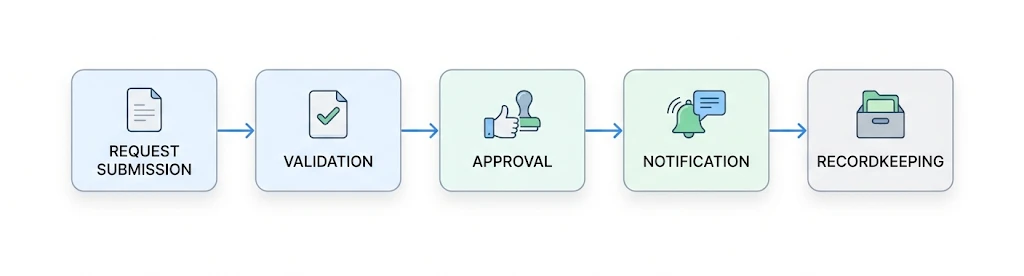
An automated approval process typically follows six connected stages:
- Request submission: An employee completes a digital form containing the required information, supporting documents and business justification.
- Validation: The system checks mandatory fields, policy requirements and other conditions before sending the request forward.
- Routing: Rules determine the appropriate approver based on factors such as amount, department, location or request type.
- Review and decision: Approvers review the request and approve, reject or return it for additional information.
- Notifications and escalation: The system sends status updates and reminders, escalating overdue requests according to configured rules.
- Recordkeeping and execution: The decision is logged, and approved requests can trigger downstream actions such as purchase order creation or payment preparation.
Consider a procurement request for new software. The department manager verifies the business need, IT reviews technical suitability, and finance checks the budget. Once the required decisions are complete, the workflow records the approval and passes the request to procurement. The routing can be sequential, with each reviewer acting in turn, or parallel, with multiple reviewers assessing the request simultaneously when policy permits.
Approval Workflows Worth Automating First
The best starting point is usually a high-volume, rules-based process that creates visible delays or requires frequent follow-ups. Prioritise workflows with clear approval criteria before tackling complex exceptions.
Purchase Order and Procurement Approvals
A purchase order approval workflow routes spending requests according to budgets, purchasing policies, supplier requirements and approval limits. It can send higher-value commitments to senior approvers while directing routine purchases through a shorter route. Automation also helps teams identify pending commitments and retain evidence of authorisation before an order is issued.
Invoice and Accounts-Payable Approvals
An invoice approval workflow directs supplier invoices to the appropriate budget owner or finance reviewer. Rules can assign invoices by department, supplier, purchase order or amount, while exceptions such as mismatched totals are flagged for investigation. This reduces manual chasing and supports a clearer hand-off between invoice review, approval and payment preparation.
Leave, Time-Off and Expense Approvals
A leave/vacation approval workflow routes absence requests to the relevant manager and can check configured notice periods, leave balances or staffing rules when connected systems provide that information. Expense workflows can apply spending limits, require receipts and route unusual claims to finance. Both processes benefit from automated status updates and clear records of decisions.
Contract and Document Sign-Off
Contracts, policies and internal documents can be routed through legal, compliance, finance or executive reviewers according to document type and risk. Version tracking and recorded sign-offs help teams distinguish the final approved document from an earlier draft.
New-Hire and Onboarding Approvals
Hiring workflows can coordinate headcount authorisation, salary approvals, equipment requests and account provisioning. Each action can be assigned to the responsible department, reducing the chance that a new employee's onboarding stalls between teams.
Discount and Quote Approvals
Sales teams can automate requests for discounts, non-standard terms or exceptional pricing. The workflow can route proposals according to margin thresholds, deal value and delegated authority, helping sales representatives obtain decisions without bypassing commercial controls.
Benefits of Automating Approvals
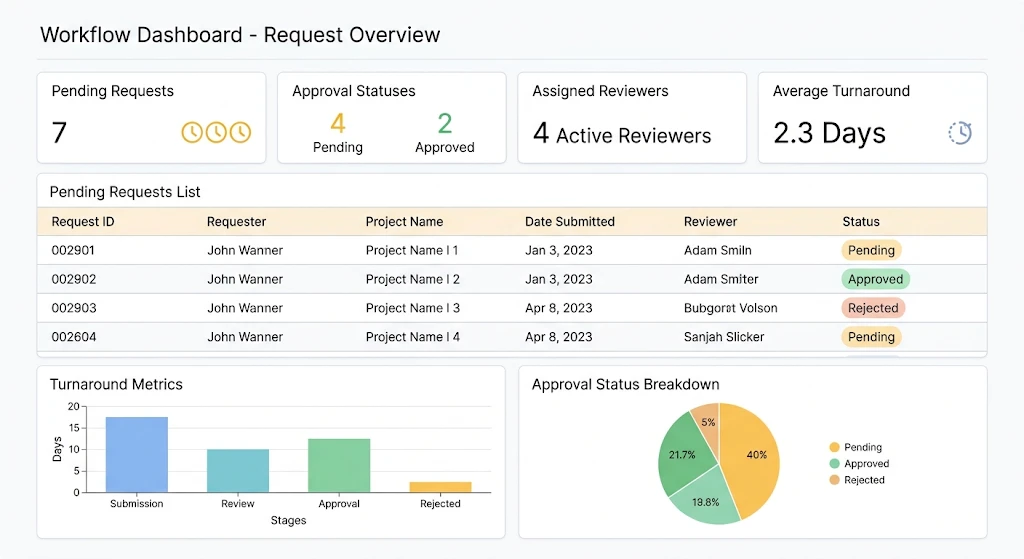
Well-designed workflow and approval automation improves more than processing speed. It creates a consistent framework for decisions across departments.
- Faster decisions: Requests move automatically to the next responsible person instead of waiting in inboxes.
- Greater visibility: Requesters and managers can see current status, ownership and outstanding actions.
- Consistent policy enforcement: Rules apply approval limits and required checks consistently, reducing avoidable process variation.
- Stronger accountability: Recorded decisions establish who approved, rejected or returned a request and when.
- Reduced administrative work: Automated reminders, routing and status updates limit repetitive coordination.
- Improved reporting: Process data reveals bottlenecks, overdue requests and recurring rejection reasons.
- Better scalability: Standardised workflows can handle higher request volumes without a proportional increase in manual follow-up.
These benefits depend on sound process design. Automating an unclear or unnecessarily complicated approval chain can simply make a poor process run faster.
Core Features to Look For
When evaluating approval workflow software, look beyond the number of integrations or the simplicity of its interface. The platform must support real approval requirements while protecting sensitive business information.
| Feature | What to evaluate | Why it matters |
| Visual or no-code workflow builder | Can authorised users modify forms, steps and rules? | Makes routine changes easier to maintain |
| Conditional and multi-stage routing | Can the system handle sequential, parallel and threshold-based approvals? | Supports different policies and complex decisions |
| Role-based access control (RBAC) | Can access be restricted by role, department and responsibility? | Protects confidential requests and limits unauthorised actions |
| Notifications, reminders and escalation | Can overdue requests trigger reminders or reassignment? | Helps prevent requests from remaining unattended |
| Audit trail and reporting | Are decisions, timestamps, comments and status changes recorded? | Supports accountability, investigations and operational reporting |
| Integrations | Can it connect to ERP, CRM, finance platforms and Slack or Microsoft Teams? | Reduces duplicate data entry and disconnected processes |
Also assess authentication options, data retention, backup and recovery, permission management and the ability to test workflow changes before deployment. If approvals involve regulated information or contractual commitments, confirm that the platform's security and logging capabilities meet your organisation's actual obligations.
Buy a Tool or Build a Custom Approval System?
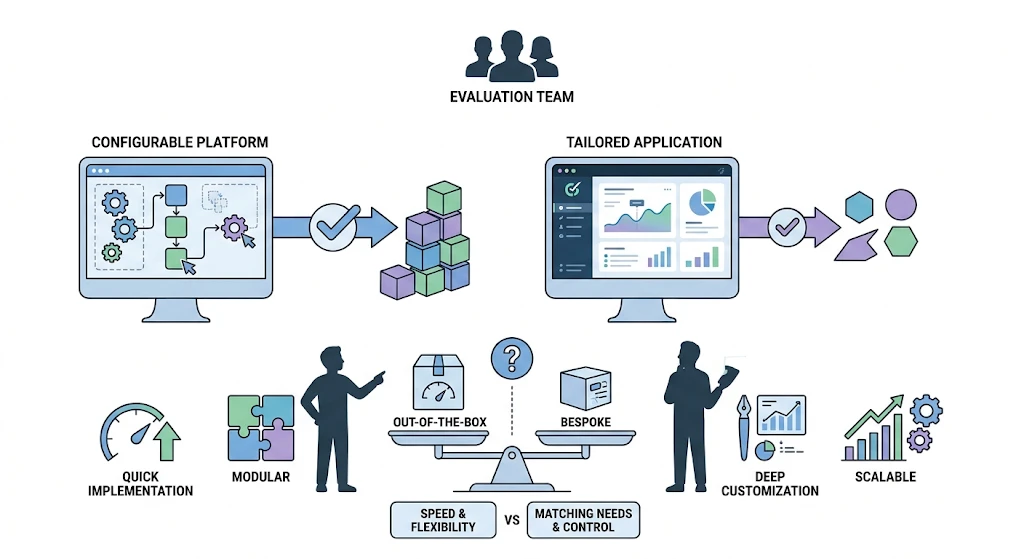
The decision between purchasing an existing platform and developing a tailored solution depends on how closely standard software matches your processes. A ready-made product can be practical for common approvals, while a custom system may suit organisations with complex rules, specialised interfaces or tightly integrated business applications.
| Decision factor | Buy existing software | Build a custom system |
| Implementation | Often faster when requirements match standard features | Requires design, development and testing |
| Process flexibility | Limited by available configuration options | Can accommodate specific business rules |
| Integrations | Depends on supported connectors and APIs | Can be designed around existing systems |
| Maintenance | Vendor manages the underlying platform | Your team or development partner maintains the solution |
| Cost considerations | Subscription, licensing and integration costs | Initial development, hosting, support and future enhancements |
| Best fit | Standard approvals with limited customisation needs | Complex workflows requiring tailored functionality |
When Buying Makes Sense
Choose existing approval workflow software when your organisation needs standard purchasing, expense or leave approvals and the platform already supports its required rules. A configurable product may reduce implementation effort, provided its licensing, integration and administration requirements remain manageable.
When Building Makes Sense
A custom solution suits businesses with complex approval rules, multiple legacy systems or requirements that off-the-shelf platforms cannot meet. For example, procurement approvals may need to combine departmental budgets, supplier checks, contract conditions and ERP data within one process. However, custom development requires ongoing investment in security, testing, maintenance and updates. Businesses should assess total ownership costs alongside initial development expenses.
The right workflow and approval automation approach depends on operational needs, integration requirements and long-term goals. A hybrid model can also work well, combining existing software for standard approvals with custom integrations for specialised processes.
How to Automate Your Approval Process (Step by Step)
Implementing approval workflow automation works best when the process is mapped and simplified before software configuration begins.
- Map the current process: Document how requests are submitted, reviewed, approved, rejected and recorded, identifying delays and duplicate checks.
- Define approvers and rules: Establish approval thresholds, delegated authority, required evidence, exception handling and escalation deadlines.
- Choose build vs buy: Compare available platforms and custom development against requirements, integration needs, security and long-term costs.
- Design the form and routing: Create the request form, validation rules, notifications and multi-stage / sequential vs parallel approvals logic.
- Pilot one workflow: Test a contained process, such as expense claims or purchase order approval, using realistic scenarios, rejected requests and exceptions.
- Roll out and measure: Train users, expand deployment gradually and monitor cycle time, overdue requests, error rates and user feedback.
Start with a measurable baseline. If a workflow currently takes several days, record its existing processing time before introducing automation. Compare like-for-like requests after deployment to determine whether the changes are producing meaningful improvements.
Make Approvals More Predictable
Effective workflow and approval automation replaces manual coordination with structured routing, clear ownership and documented decisions. By starting with a high-volume process, defining approval rules and measuring results, organisations can reduce avoidable delays while retaining the oversight their decisions require. The right solution should fit existing business systems, protect sensitive information and adapt as processes evolve. Whether you need a configurable platform or a tailored system, the priority is to create an approval process that is easier to manage, monitor and improve.
Explore Phentech's Business Process Automation solutions or schedule a consultation to discuss your approval workflow requirements.